Dashy
LibrisLog can be integrated into Dashy, a self-hosted dashboard for your services, using one of its widget types:
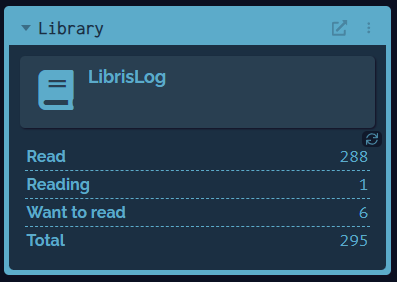
- Custom API widget (Dashy ≥4.3.1) — a simple, built-in widget that fetches your stats directly (recommended).
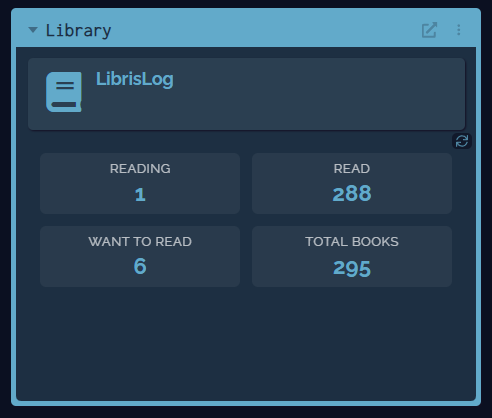
- HTML embedded widget — a fully customizable widget with styled stat cards.
Prerequisites
- A running LibrisLog instance reachable from your Dashy server
- An API key with access to the statistics endpoint
Custom API Widget (Recommended)
Since Dashy v4.3.1 you can use the built-in custom API widget. Add the following to your Dashy conf.yml:
widgets:
  - type: customapi
    options:
      url: <LIBRISLOG-URL>/api/books/stats
      headers:
        X-API-Key: "<API-KEY>"
      refreshInterval: 60000
      display: block
      mappings:
        - field: books_read
          label: Read
          format: number
        - field: books_reading
          label: Reading
          format: number
        - field: books_want_to_read
          label: Want to read
          format: number
        - field: total_books
          label: Total
          format: number
The refreshInterval is specified in milliseconds. 60000 equals 1 minute.
HTML Embedded Widget
For full control over the appearance you can use the HTML embedded widget.
Add the following to your Dashy conf.yml:
widgets:
  - type: embed
    updateInterval: 300
    options:
      html: |
        <div class="librislog-widget">
          <div class="ll-stat-item">
            <span class="ll-label">Reading</span>
            <span class="ll-value" id="ll-reading">-</span>
          </div>
          <div class="ll-stat-item">
            <span class="ll-label">Read</span>
            <span class="ll-value" id="ll-read">-</span>
          </div>
          <div class="ll-stat-item">
            <span class="ll-label">Want to Read</span>
            <span class="ll-value" id="ll-wtr">-</span>
          </div>
          <div class="ll-stat-item">
            <span class="ll-label">Total Books</span>
            <span class="ll-value" id="ll-total">-</span>
          </div>
        </div>
      css: |
        .librislog-widget {
          display: grid;
          grid-template-columns: repeat(2, 1fr);
          gap: 0.75rem;
          padding: 0.5rem;
          font-family: inherit;
        }
        .ll-stat-item {
          display: flex;
          flex-direction: column;
          align-items: center;
          justify-content: center;
          background: var(--background-elevated, rgba(255,255,255,0.05));
          border: 1px solid var(--outline-color, rgba(255,255,255,0.1));
          border-radius: 6px;
          padding: 0.5rem;
          text-align: center;
        }
        .ll-label {
          font-size: 0.8rem;
          opacity: 0.7;
          color: var(--text-color, #fff);
          margin-bottom: 0.25rem;
          text-transform: uppercase;
          letter-spacing: 0.05em;
        }
        .ll-value {
          font-size: 1.4rem;
          font-weight: bold;
          color: var(--primary, #00bc8c);
        }
      script: |
        (async function() {
          const apiUrl = '<LIBRISLOG-URL>/api/books/stats';
          const apiKey = '<API-KEY>';

          try {
            const response = await fetch(apiUrl, {
              method: 'GET',
              headers: {
                'X-API-Key': apiKey,
                'Content-Type': 'application/json'
              }
            });

            if (!response.ok) throw new Error('API request failed');

            const data = await response.json();

            document.getElementById('ll-reading').innerText = data.books_currently_reading ?? data.books_reading ?? 0;
            document.getElementById('ll-read').innerText = data.books_read ?? 0;
            document.getElementById('ll-wtr').innerText = data.books_want_to_read ?? 0;
            document.getElementById('ll-total').innerText = data.total_books ?? 0;

          } catch (error) {
            console.error('LibrisLog Widget Error:', error);
            const elements = ['ll-reading', 'll-read', 'll-wtr', 'll-total'];
            elements.forEach(id => {
              const el = document.getElementById(id);
              if (el) el.innerText = '!';
              if (el) el.style.color = 'var(--danger, #ff0033)';
            });
          }
        })();
The updateInterval is specified in seconds. 300 equals 5 minutes.
Placeholders
Replace the placeholders with your own values:
| Placeholder | Example | Description |
|---|---|---|
<LIBRISLOG-URL> | http://192.168.1.100:8000 | The base URL of your LibrisLog instance (http or https) |
<API-KEY> | lk_nRHsF3jxIBDa9u.... | An API key with access to the statistics endpoint |
CORS
The embed widget runs inside the Dashy iframe and fetches the API directly from the browser. You must add your Dashy URL to the CORS_ORIGINS environment variable of the LibrisLog backend:
CORS_ORIGINS=["<LIBRISLOG-URL>"]The custom API widget also requires CORS if Dashy is configured to render widgets client-side. If CORS errors occur, add the origin as shown above.
Results
Custom API (API Response) Widget
HTML Embed Widget