Homer
LibrisLog can be integrated into Homer, a self-hosted dashboard for your services, using its LibrisLog custom service.
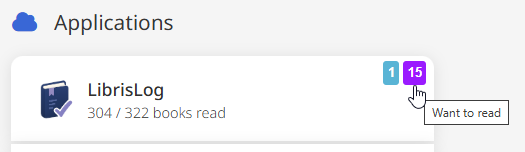
This smart card displays your reading statistics: total books, books read, currently reading, and want-to-read counts directly on your Homer dashboard.
Prerequisites
- A running LibrisLog instance reachable from the browser you use to view your Homer dashboard (the card fetches data client-side)
- An API key with access to the statistics endpoint
Configuration
Add the following service entry to your Homer config.yml:
- name: "LibrisLog"
  type: "LibrisLog"
  logo: "https://docs.librislog.app/logo.png"
  url: "<LIBRISLOG-URL>"
  apikey: "<API-KEY>"
The card supports auto refresh, which can be enabled individually for each service using the updateIntervalMs option.
WARNING
Homer serves your config.yml at /assets/config.yml over HTTP. The API key in it is readable by anyone who can access your Homer instance. Only include it if your Homer instance is protected by authentication or access controls.
Placeholders
Replace the placeholders with your own values:
| Placeholder | Example | Description |
|---|---|---|
<LIBRISLOG-URL> | http://192.168.1.100:8000 | The base URL of your LibrisLog instance (http or https) |
<API-KEY> | lk_nRHsF3jxIBDa9u.... | An API key with access to the statistics endpoint |
<HOMER-URL> | http://192.168.1.100:8080 | The base URL of your Homer instance |
CORS
The Homer card fetches the API directly from the browser. You must add your Homer URL to the CORS_ORIGINS environment variable of the LibrisLog backend:
CORS_ORIGINS=["<HOMER-URL>"]If the card stays empty or shows no statistics, check your browser console for CORS errors.
Result