
API Documentation
LibrisLog provides a full REST API with interactive documentation.
Interactive API Docs
Two documentation interfaces are available when the backend is running:
- Swagger UI:
http://localhost:8000/api/docs - ReDoc:
http://localhost:8000/api/redoc
The OpenAPI schema is also available at:
- JSON:
http://localhost:8000/api/openapi.json
Authentication
All API endpoints (except health check and documentation) require authentication via an API key.
Creating an API Key
- Log in to the web application
- Go to your Profile page
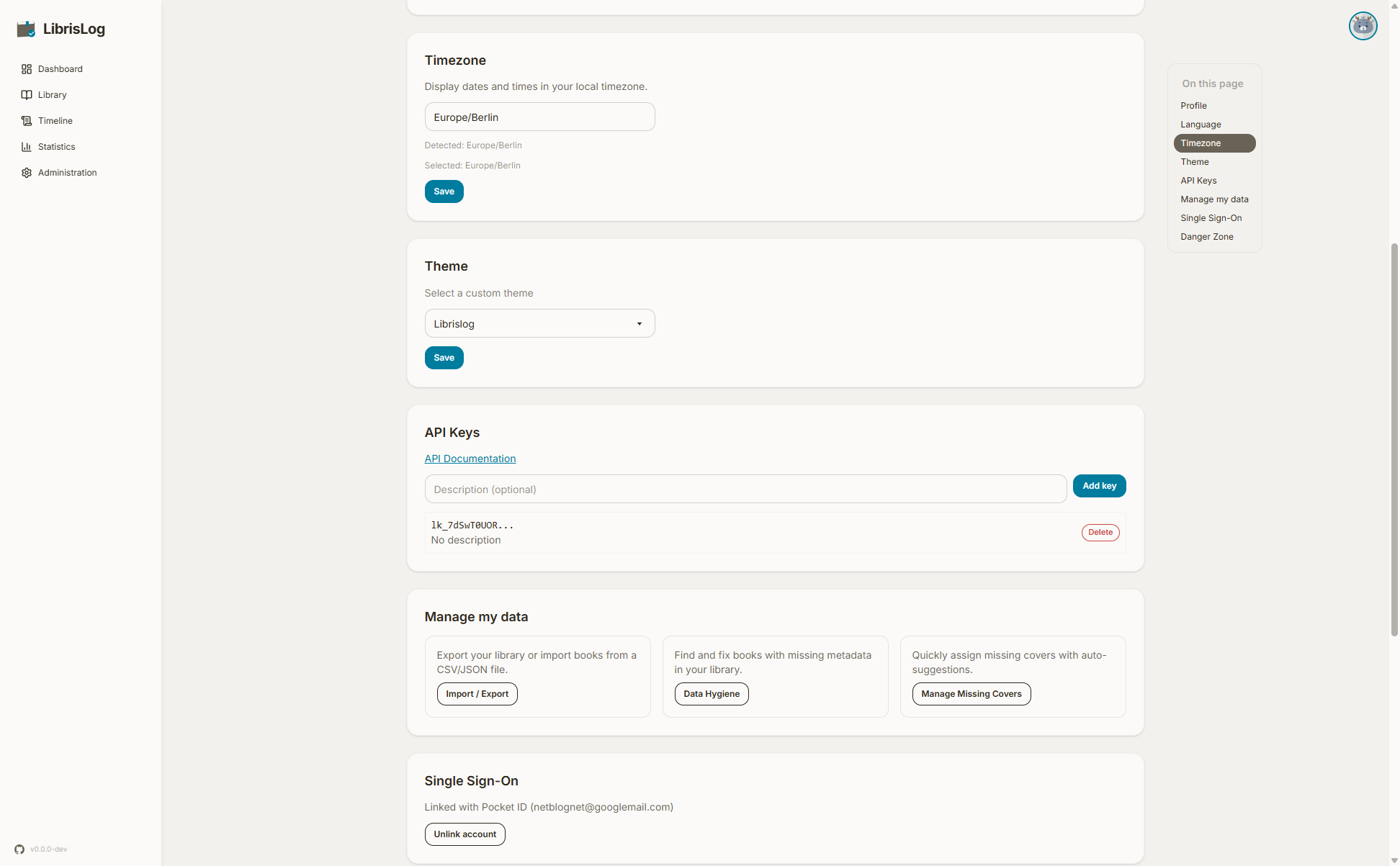
- Scroll to the "API Keys" section
- Click "Create API Key"
- Enter a description (optional)
- Copy the key immediately — it is shown only once
Using an API Key
Include the key in the X-API-Key header with every request:
curl -H "X-API-Key: YOUR_KEY_HERE" http://localhost:8000/api/booksExample Request
# List all books
curl -H "X-API-Key: YOUR_KEY_HERE" \
  http://localhost:8000/api/books

# Create a new book
curl -X POST \
  -H "X-API-Key: YOUR_KEY_HERE" \
  -H "Content-Type: application/json" \
  -d '{"title": "The Great Gatsby", "authors": ["F. Scott Fitzgerald"]}' \
  http://localhost:8000/api/books
Book author fields
Book responses contain two author fields:
author— deprecated. The joined string of all authors (e.g."Neil Gaiman, Terry Pratchett"). Kept for backward compatibility with existing consumers; useauthorsinstead.authors— the list of individual author names (e.g.["Neil Gaiman", "Terry Pratchett"]).
The author field is marked as deprecated in the OpenAPI spec (visible in Swagger UI) on all book schemas. It still works but may be removed in a future release.
When creating a book you must provide at least one author — either authors as a list, or the legacy author string. If both are sent, authors takes precedence. A request with neither (or with an empty authors list) is rejected with a 422 validation error.
Books have an optional nullable medium field. Accepted values are Print, eBook, Audiobook, Comic / Graphic Novel, and Magazine / Newspaper. Omit it or send null when the medium is not known. Books can be filtered with GET /api/books?medium=Audiobook or searched with q=medium:audiobook.
For updates, author/authors are optional; if you send an empty authors list the book's authors are cleared.
The legacy author string is parsed on commas, tag-style (e.g. "Isaac Asimov, Frank Herbert" becomes two authors). This only applies to the API create/update path. It differs from file import (CSV/JSON/XLSX), where a single author string is split on ;, &, or and — never on commas — so a name like "Asimov, Isaac" stays one author. See Import & Export for the import behaviour.
Update reading status
curl -X POST
-H "X-API-Key: YOUR_KEY_HERE"
-H "Content-Type: application/json"
-d '{"new_status": "read"}'
http://localhost:8000/api/books/1/transition-status
## Key Endpoints

### Books

| Method | Endpoint | Description |
|--------|----------|-------------|
| GET | `/api/books` | List all books |
| POST | `/api/books` | Create a book |
| GET | `/api/books/{id}` | Get book details |
| PUT | `/api/books/{id}` | Update book |
| DELETE | `/api/books/{id}` | Delete book |
| POST | `/api/books/{id}/transition-status` | Change reading status |

### Progress

| Method | Endpoint | Description |
|--------|----------|-------------|
| GET | `/api/books/{id}/progress` | List progress entries |
| POST | `/api/books/{id}/progress` | Add progress entry |
| PATCH | `/api/books/{id}/progress/{entry_id}` | Update progress date |
| DELETE | `/api/books/{id}/progress/{entry_id}` | Delete progress entry |

### Statistics

| Method | Endpoint | Description |
|--------|----------|-------------|
| GET | `/api/statistics` | Full statistics |
| GET | `/api/statistics/pages-per-day` | Daily page breakdown |

### Data Import/Export

| Method | Endpoint | Description |
|--------|----------|-------------|
| POST | `/api/data/export` | Export data |
| POST | `/api/data/import/parse` | Parse import file |
| POST | `/api/data/import/validate` | Validate import |
| POST | `/api/data/import/execute` | Execute import |

### Book Import (External Sources)

| Method | Endpoint | Description |
|--------|----------|-------------|
| GET | `/api/import/search` | Search external sources |
| GET | `/api/import/search/stream` | Stream search progress |
| POST | `/api/import` | Import a candidate |

### Authentication

| Method | Endpoint | Description |
|--------|----------|-------------|
| POST | `/api/auth/setup` | Create first admin (only when no admin exists) |
| POST | `/api/auth/login` | Log in with email and password |
| POST | `/api/auth/logout` | Log out (clear session) |
| GET | `/api/auth/me` | Get current user |
| GET | `/api/auth/csrf` | Get CSRF token |
| POST | `/api/auth/forgot-password` | Request a password reset email (always returns 200) |
| POST | `/api/auth/reset-password` | Reset password using a token from the reset email |

::: details Password Reset Endpoints
These endpoints do not require an API key or session — they are public.

**Forgot Password**

```bash
curl -X POST http://localhost:8000/api/auth/forgot-password \
  -H "Content-Type: application/json" \
  -d '{"email": "user@example.com", "locale": "en"}'
Always returns 200 with {"message": "If the email is registered, a reset link has been sent"} to prevent user enumeration. The locale field is optional (defaults to en) and controls the email language.
Reset Password
curl -X POST http://localhost:8000/api/auth/reset-password \
  -H "Content-Type: application/json" \
  -d '{"token": "token-from-email", "password": "new-secure-password"}'
Returns 200 on success, 400 if the token is invalid/expired or the password doesn't meet complexity requirements. After a successful reset, all existing sessions for that user are invalidated. :::
Error Handling
The API returns standard HTTP status codes:
200— Success201— Created204— No content (delete success)400— Bad request401— Unauthorized (missing or invalid API key)404— Not found409— Conflict (e.g., duplicate ISBN)422— Validation error
Error responses include a JSON body with details:
{
  "detail": "Book not found"
}