Heimdall
LibrisLog can be integrated into Heimdall, an application dashboard and launcher for your self-hosted services, as a LibrisLog enhanced app.
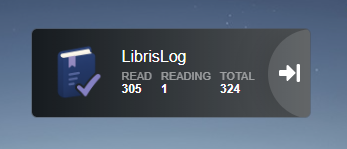
The enhanced app displays your reading statistics (books read, currently reading, want-to-read, and total counts) directly on your Heimdall tile.
Prerequisites
- A running LibrisLog instance reachable from the Heimdall server (Heimdall fetches the statistics server-side, so no CORS configuration is needed)
- An API key with access to the statistics endpoint
Configuration
In Heimdall, add a new item and pick LibrisLog as the application type (it is listed as an enhanced app).
In the config section of the app, enter the address of your LibrisLog instance in the URL field. The URL must end with a trailing slash:
http://<LIBRISLOG-URL>/Enter your API key into the Password (API key) field.
Select which values the tile should display under Stats to show: Read, Reading, Want to read, and/or Total. Hold Ctrl (or Cmd) to select multiple entries.
Click Test to verify the connection. If everything is configured correctly, Heimdall reports "Successfully communicated with the API".
The URL field needs a trailing slash
The config section of a Heimdall enhanced app can be confusing: the URL field needs the address of your LibrisLog instance followed by a slash, e.g. http://192.168.1.100:8000/. Without the trailing slash the app cannot fetch your statistics: the tile stays empty and the Test button fails.
Result